
 Sign in

 Български
 Čeština
 Dansk
Dansk
 Deutsch
 Eesti
Eesti
 Ελληνικά
 Español
 Français
 Hrvatski
 Italiano
 Latviešu
 Lietuvių
 Magyar
 Nederlands
 Norsk
Norsk
 Polski
 Português
 Română
 Slovenčina
 Slovenščina
 Српски (Ћирилица)
 Suomi
Suomi
 Svenska
 Türkçe
 Русский
 Українська
Requirements for PCN notification
In this chapter, we will explain when you must notify a mixture via the portal in PCN format and what data you need for this purpose. You can submit the notification directly from the SBLCore software.
When the obligation arises
You must notify a mixture via the portal if it is:
- hazardous to human health (H-statements beginning with the number 3 – H3xx), or
- has physical hazards (H-statements beginning with the number 2 – H2xx).
You submit the notification in PCN format before placing the mixture on the market or when you modify it.
You can determine directly in the SBLCore software whether you must notify the mixture:
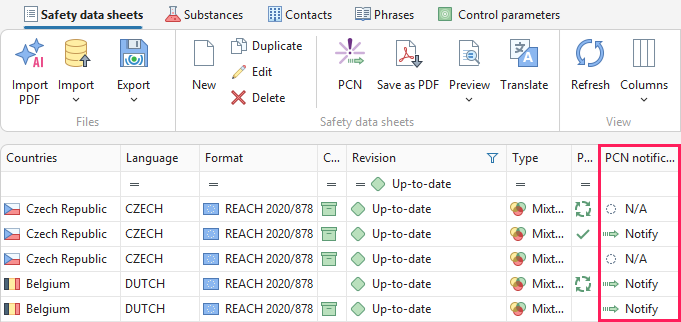
a) in the Safety data sheets tab, based on the Notify information in the PCN notification status column, or
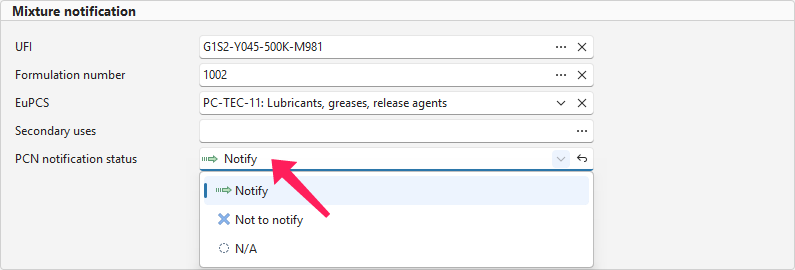
b) in an open safety data sheet, based on the status in the PCN notification status section or the PCN button in the toolbar.
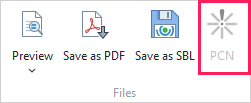
If the product does not require notification, you will see the status N/A and the PCN button will be greyed out.
What needs to be completed
For a successful notification in PCN format, several data fields must be completed. Click the PCN button in the toolbar, and the software will automatically check whether all mandatory information has been entered.

If any information is missing or incorrectly completed, the following will be displayed:
 Error – it must be corrected; otherwise, the notification cannot be saved and submitted. For example: “Specify the colour in Section 9 ‘Properties’.”
 Warning – recommended modifications or warning information. The notification can still be submitted without making the changes. For example: “It is recommended to specify at least 90% of the total mixture concentration.”
Notice: In some states (e.g. Hungary), the notification is required to contain neither errors nor warnings.
The following information must be completed:
-
Company UUID – the Legal Entity UUID is a unique company identifier assigned by ECHA. You can find it after logging in to your account on the ECHA website. The complete registration procedure can be found in the Registration in the PCN portal chapter. Then enter the identifier in the company editor in the Contacts tab.
-
Product name – it must correspond to the name in the safety data sheet and on the label. It is entered in the Identification section. If you sell the product under multiple names, enter them in the same section under Packaging, Other Names, Other UFIs.
-
UFI code – this is a unique mixture identifier that links a specific product to its composition. Without a completed notification, the UFI code is not valid and cannot be placed on the label. It is entered in the Identification section.
You can obtain a UFI code by:
- receiving it from a supplier,
- generating your own directly in SBLCore,
- or using any online generator.
-
EuPCS (European Product Categorisation System) – specifies what the product is used for. It is selected in the SDS editor in the Identification section. The software includes the official catalogue according to the intended use of the product. At least one code must be entered for the notification; optionally, you may also add secondary uses.
-
Packaging size and type – in the Identification – Packaging section, select all packaging sizes and types in which you will place the product on the market. SBLCore offers only the options available in the PCN portal.
-
Use category – in the Supporting data section, select the target user group:
- for consumers (retail) – the product is used by a regular consumer in a household,
- for professional use – the product is used by a trained person in their professional activity (e.g. a tradesperson, cleaning company),
- for industrial use – the product is used within manufacturing or a large-scale operation (e.g. a factory) and never leaves the site.
-
Mixture composition – in the Supporting data section, at least 70% of the composition must be specified, with a maximum of 105%. The software will alert you if either condition is not met.
-
Classification and labelling – H-, P-, and EUH-statements must be identical in all stages (safety data sheet, label, and notification).
-
Physical and chemical properties – in Section 9, complete at least the following information:
- physical state,
- primary colour selected from the available options,
- pH value or the reason for not providing it.
Only options permitted by the PCN portal are available.
-
Toxicological information – this forms part of Section 11 and relates to both the substances contained and the product as a whole. For example, information on acute toxicity, skin corrosion, serious eye damage, etc.
Types of notifications
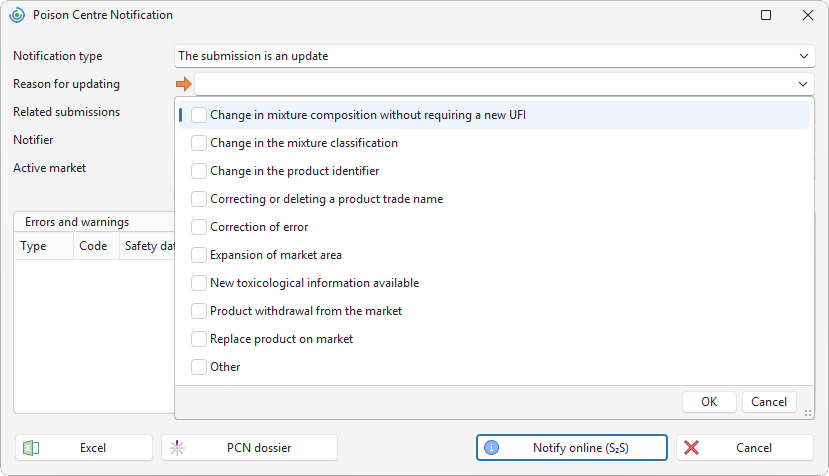
Several types of notifications are distinguished. Click the PCN button in the toolbar. Then select the notification type. This determines whether you are creating a new submission or modifying an existing record. It depends on the scope of the changes.
a) Initial notification – the first notification of the given mixture in PCN under your company. The notification is submitted for all states in which the product is placed on the market.
b) Notification update – used in cases where changes do not affect the mixture composition and there is no need to generate a new UFI code. The conditions are laid down in Annex VIII (Part B, Section 4) of the CLP Regulation.
Examples include:
- change of the mixture identifier (name, etc.)
- change of the mixture classification (relating to H2xx and/or H3xx)
- addition of new toxicological information for the mixture and/or its components
- change in composition that does not require generation of a new UFI code
- change or addition of an EuPCS category
- change or addition of packaging size and type
- change of contact details
- other changes – e.g. change of pH, colour, correction of an error, etc.
c) New notification following a significant composition change – submitted when the change no longer meets the conditions for a simple notification update. In such cases, a new UFI code must be generated.
Examples include:
- addition, replacement, or removal of a component
- change in component concentration outside the original range
The criteria for assessing composition changes are set out in Annex VIII (Part B, Section 4) of the CLP Regulation.